Posts mit dem Label Feature werden angezeigt. Alle Posts anzeigen

Donnerstag, 2. Mai 2013

Get current versions for activated features (not feature definitions) in a web or site collection

Recently I wrote a PowerShell-Script which writes the current version-numbers of web-features specified by a name-filter into a file. These versions are not from the feature-definition but from the feature activated in a web.

An example for this could be the following:
On a SharePoint-server a feature named custom_feature_1 was installed which has a version of 3.0.0.0 because it's been updated a few times during the lifecycle of the appication.
Because the rootweb was created first, the feature's version is 1.0.0.0 there. A newer subweb below has been created after the feature was updated and there the feature's version is 2.0.0.0. Now, after the third update, another web will be created where the feature now has a version of 3.0.0.0.

So how can you easily get the version of the feature activated in one of these webs?

You can use this PowerShell-script to get all information about your features:

get-spweb http://customsitecollection/customweb |% {$_.Features} | where-object {$_.Definition -ne $null} | where-object {$_.Definition.DisplayName.StartsWith("custom")} |% {new-object psobject -Property @{Id = $_.DefinitionId; Version = $_.Version; DisplayName = ($_ | select -ExpandProperty Definition).DisplayName; Scope = ($_ | select -ExpandProperty Definition).Scope; }} | format-table -Property * -Autosize | Out-String -Width 120 | out-file custom_web_features.txt


Just copy these lines and replace the bold-marked parts by your own needs:
http://customsite/customweb - The full path to the web you want the feature-versions from
custom - The name that the features starts with in SharePoint-Root features-folder
custom_web_features.txt - The name of the file that's created with information

The content of the file should look like this:
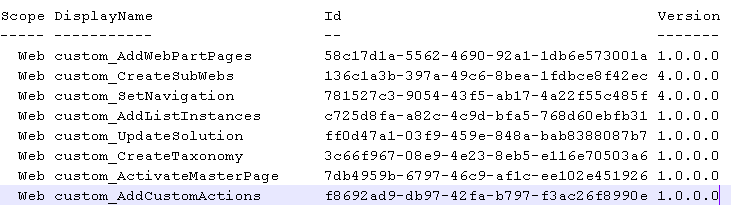

You can reuse the script for site-scoped features too. Just replace get-spweb by get-spsite and a valid URL to a sitecollection.

Dienstag, 4. Oktober 2011

Error occurs while trying to upgrade installed features of an upgraded solution

It’s way back since my last post, but at last I found something very useful to post.

During the process of developing on a SharePoint 2010 solution, to have clean presuppositions for testing and avoid phantom mistakes I very often create new site collections and delete them afterwards. A part of this process is also removing and adding newer versions of the solutions to the solution-store. So from time to time I was confronted with strange error messages when I tried to upgrade features to new versions.

I concretely tried to do it the Microsoft recommended way and used a modified version of the program, you can find here: http://msdn.microsoft.com/en-us/library/ff798298.aspx

The program that iterates over the SPWebApplication to find upgradable features sometimes fails with an error message that says that it can’t find a special SiteCollection: The site with the id D0D529C1-DC06-4DB0-A8A3-81466E1E75DB could not be found.
This is true because it has been previously deleted by me and is no longer available in Central Administration or anywhere else. It seems, there are still some SiteCollection-related artifacts in the content database stored that prevent a clean upgrading of the new versioned features.

Have a look at the Default TimerJobs,  the promisingly entry “Gradual Site Delete”, we perhaps can use to solve this issue with tools out of the box. By default it’s executed daily but we can change the cycle to earlier executions or even start it manually.

This blog described its functionality as “Deletes all the data from the host content database for all deleted site collections”. What a pitty, in my case, it doesn’t. The error remains.

Now it’s time to have a look at the content database. The name of this table looks encouraging: dbo.SiteDeletion

After opening the table, an entry appears that includes the evil SiteId, which seems to be the crux of the matter:


Luckily Microsoft gave us the method ForceDeleteSite on the SPContentDatabase-class.

If you write a really short program, for e.g. a console application that takes the Uri to get the SPWebApplication-object and the Guid of the corrupted SiteCollection, you can create a new entry to the database-table with a datetime of 1900-01-01.


Simply, there are only those two lines needed:

SPWebApplication spWebApplication = SPWebApplication.Lookup(new Uri("http://mywebapplication")); // insert the webapplication

spWebApplication.ContentDatabases[0].ForceDeleteSite(new Guid("D0D529C1-DC06-4DB0-A8A3-81466E1E75DB"), true, false); // insert the ID from the errormessage


After that, retry running the “Gradual Site Delete”-timerjob and – surprise – both entries are deleted.


If you retry upgrading your feature, no more annoying error message occurs.

Montag, 14. Juli 2008

Site Provisioning Reihenfolge

Eine schnelle Suche nach einer Auflistung, in welcher Reihenfolge Einträge der onet.xml abgearbeitet werden, brachte mich auf folgenden Blog-Eintrag der MSDN: *click*

Ich habe den Eintrag mal ins Deutsche übersetzt:

SharePoint stellt in dieser Reihenfolge bereit:
  1. die globale onet.xml
  2. in der onet.xml definierte SiteScope-Features in der Reihenfolge, wie sie angegeben sind
  3. Stapled Features auf SiteScope-Ebene in "zufälliger" Reihenfolge
  4. in der onet.xml definierte WebScope-Features in der Reihenfolge, wie sie angegeben sind
  5. Stapled Features auf WebScope-Ebene in "zufälliger" Reihenfolge
  6. in der onet.xml definierte List Instanzen
  7. in der onet.xml definierte Modules
Das bedeutet:
  1. SiteFeatures sollten niemals von etwas abhängig sein, was durch ein WebFeature bereitgestellt wurde. Da WebFeatures immer nach SiteFeatures ausgewertet werden, kann ein SiteFeature nicht auf eine Resource angewiesen sein, die in einem WebFeature bereitgestellt wird.
  2. Features können nicht von Listen oder Dateien abhängig sein, die über die onet.xml bereitgestellt werden. Features werden vor den Dateien und Modulen, die in der onet.xml enthalten sind, verarbeitet. Trotzdem können List Instanzen und Dateien, die in der onet.xml definiert sind, Abhängigkeiten auf sich in Features befindenden List Definitionen oder List Instanzen enthalten.
  3. In der onet.xml oder in WebFeatures, die sich innerhalb des -Tags befinden, definierte List Instanzen und Module sollten niemals Abhängigkeiten auf "Stapled Features" enthalten. "Stapled Features" sind flüchtig und es kann sein, dass sie nicht im Stapel abgearbeitet werden wenn der Administrator die Konfiguration so einstellt.

Freitag, 11. Juli 2008

Fehler bei Benutzer-Auswahlfeldern, die keine sind

Höchst erfreulich ist es, wenn man zum Feierabend am Freitag noch seltsame "Fehler" gelöst bekommt und dabei sogar noch etwas lernt:

Einer Liste haben wir über unsere Solution ein UserField hinzugefügt welches wir per FeatureReceiver auf eine - vorher in einem anderen FeatureReceiver generierte - Benutzergruppe zeigen lassen um die Suche im Katalog auf diese Gruppe einzuschränken.

Das hat auch wunderbar funktioniert... Wenn ich als SiteCollection-Administrator ein neues Element innerhalb dieser Liste erstellen möchte, sieht das Formular aus, wie erwartet. Als anderer User, egal, welche Rolle (ausser dem SiteCollection-Administrator) er innehat, erscheint die "Fehlermeldung": "Das Steuerelement ist nicht verfügbar, da Sie nicht über die erforderlichen Berechtigungen verfügen."

Googeln hat leider nichts ergeben, auch das Herumspielen mit den Berechtigungen des Users oder der Gruppe, in der er Mitglied ist, blieb erfolglos.

Dann aber fiel der Groschen, als ich mich an ein früheres SharePoint-Projekt von uns erinnerte. Düster erinnerte ich mich, dort mal eine Einstellung gesehen zu haben, die schaltet, wer Mitgliedschaften einer Gruppe anzeigen darf. Und siehe da, nachdem ich über die Oberfläche die Einstellung "Jeder" vornahm, hat es plötzlich funktioniert.

Rot umrandet im unteren Bild: die "Fehlermeldung"
Grün umrandet im unteren Bild: der Soll-Zustand des Auswahlfeldes, nachdem "Jeder" gewählt wurde


Das nächste Bild zeigt die Einstellung in den Gruppeneinstellungen:


Nun galt es noch, das ganze programmatisch umzusetzen, was in drei Zeilen erledigt war:

SPGroup spGroup = siteGroups[groupTitle];
spGroup.OnlyAllowMembersViewMembership = false;
spGroup.Update();
spGroup.OnlyAllowMembersViewMembership = true; würde bewirken, dass die Einstellung "Gruppenmitglieder" gewählt wird.

Fazit: Manchmal sind Fehler gar keine Fehler im herkömmlichen Sinne. Hier muss ich wohl noch etwas mehr in die SharePoint-Denke hineinkommen. ;-)

Beschreibungen der Attribute der Solution-Bestandteile

Der Blog von André Vala bietet sehr sehr nützliche Informationen zu den einzelnen Teilen einer Solution, z.B. alles über ListInstanzen, ListTemplate-Features, ContentType-Features, SiteColumn-Features inklusive einer Beschreibung der wichtigen XML-Tag-Attribute.

List Instance Features
List Template Features
Site Content Type Features
Site Column Features