Montag, 25. November 2013

A potentially dangerous Request.Form value was detected from the client (ctl00$PlaceHolderMain$...

Recently I got the following errormessage in SharePoint 2013 after trying to save an edited publishing page. Also it was not possible to add any webpart.
Some googling resultet in different web.config-modifications, some said to set requestValidationMode="4.0" to requestValidationMode="2.0" in <system.web>-node, others recommended to set validateRequest="false"in <pages>-node. In fact for it only worked after I did both changes. So search for

<system.web>
 <httpRuntime requestValidationMode="4.0" />
</system.web>

and set requestValidationMode to "2.0" and search for

<pages enableSessionState="false" enableViewState="true" enableViewStateMac="true" validateRequest="true" clientIDMode="AutoID" pageParserFilterType="Microsoft.SharePoint.ApplicationRuntime.SPPageParserFilter, Microsoft.SharePoint, Version=15.0.0.0, Culture=neutral, PublicKeyToken=71e9bce111e9429c" asyncTimeout="7">
      <namespaces>
        <remove namespace="System.Web.UI.WebControls.WebParts" />
      </namespaces>
      <tagMapping>
        <add tagType="System.Web.UI.WebControls.SqlDataSource, System.Web, Version=4.0.0.0, Culture=neutral, PublicKeyToken=b03f5f7f11d50a3a" mappedTagType="Microsoft.SharePoint.WebControls.SPSqlDataSource, Microsoft.SharePoint, Version=15.0.0.0, Culture=neutral, PublicKeyToken=71e9bce111e9429c" />
      </tagMapping>
      <controls>
        <add tagPrefix="asp" namespace="System.Web.UI" assembly="System.Web.Extensions, Version=4.0.0.0, Culture=neutral, PublicKeyToken=31bf3856ad364e35" />
        <add tagPrefix="spsswc" namespace="Microsoft.Office.Server.Search.WebControls" assembly="Microsoft.Office.Server.Search, Version=15.0.0.0, Culture=neutral, PublicKeyToken=71e9bce111e9429c" />
      </controls>
    </pages>

and set validateRequest to "false".

Donnerstag, 2. Mai 2013

Get current versions for activated features (not feature definitions) in a web or site collection

Recently I wrote a PowerShell-Script which writes the current version-numbers of web-features specified by a name-filter into a file. These versions are not from the feature-definition but from the feature activated in a web.

An example for this could be the following:
On a SharePoint-server a feature named custom_feature_1 was installed which has a version of 3.0.0.0 because it's been updated a few times during the lifecycle of the appication.
Because the rootweb was created first, the feature's version is 1.0.0.0 there. A newer subweb below has been created after the feature was updated and there the feature's version is 2.0.0.0. Now, after the third update, another web will be created where the feature now has a version of 3.0.0.0.

So how can you easily get the version of the feature activated in one of these webs?

You can use this PowerShell-script to get all information about your features:

get-spweb http://customsitecollection/customweb |% {$_.Features} | where-object {$_.Definition -ne $null} | where-object {$_.Definition.DisplayName.StartsWith("custom")} |% {new-object psobject -Property @{Id = $_.DefinitionId; Version = $_.Version; DisplayName = ($_ | select -ExpandProperty Definition).DisplayName; Scope = ($_ | select -ExpandProperty Definition).Scope; }} | format-table -Property * -Autosize | Out-String -Width 120 | out-file custom_web_features.txt


Just copy these lines and replace the bold-marked parts by your own needs:
http://customsite/customweb - The full path to the web you want the feature-versions from
custom - The name that the features starts with in SharePoint-Root features-folder
custom_web_features.txt - The name of the file that's created with information

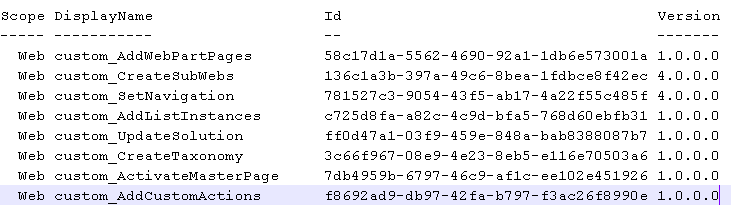
The content of the file should look like this:


You can reuse the script for site-scoped features too. Just replace get-spweb by get-spsite and a valid URL to a sitecollection.

Dienstag, 23. April 2013

"Active Deployment Configuration"-setting in Visual Studio 2012 is always "Default"

There is a bug in current Visual Studio 2012 which always sets the "Active Deployment Configuration" to "Default" after re-opening the program/solution.
If you set "No Activation", this is correctly stored in the .csproj-file but VS ignores this and preselectes "Default" on opening:

 
I reported this to Microsoft and finally got an answer that said I should install the Microsoft Office Developer Tools which were released in March 2013 (can be found here). After installing, the bug indeed was fixed and now the configuration is loaded correctly:


Personally I think, Microsoft should fix this bug in a Visual Studio update but not in an separate downloadable add-on because it's a bug by Visual Studio itself.

Freitag, 23. November 2012

Issues with Lookup-Fields with each more than 20 items

If you have multiple lookup-fields in your form which reference to more than 20 items (hardcoded limit in the LookupField-Control!), you may notice to the display and behaviour of your control:

- The rendering of the field switches from select-tag to an input-tag and an img-tag. A click on the image shows a layer with the selectfield.
- This only occures to Internet Explorer, not to Firefox.

The naughty thing on this is the issue, that the selectfield-layer appears below the first-clicked lookup-field, no matter, which lookupfield you click afterwards.

Click on the first lookup:


Click on the second lookup:


This bug can be fixed by override a function in the core.js that must be loaded immediatly in the masterpage. A good piece of working code I found here today: http://dipaktele.blogspot.de/2012/07/two-lookup-field-with-more-than-20.html

I copied the code found on this page and added it here:


function FilterChoice(opt, ctrl, strVal, filterVal) {
if (typeof (opt) != "undefined") {
var i,
cOpt = 0,
bSelected = false,
strHtml = "",
strId = opt.id,
strName = opt.name,
strMatch = "",
strMatchVal = "",
strOpts = ctrl.choices,
rgopt = strOpts.split("|"),
offSet = $(ctrl).position(),
x = offSet.left,
y = offSet.top 15,
strHidden = ctrl.optHid,
iMac = rgopt.length - 1,
iMatch = -1,
unlimitedLength = false,
strSelectedLower = "";
if (opt != null && opt.selectedIndex >= 0) {
bSelected = true;
strSelectedLower = opt.options[opt.selectedIndex].innerText;
}
for (i = 0; i < rgopt.length; i = i 2) {
var strOpt = rgopt[i];
while (i < iMac - 1 && rgopt[i 1].length == 0) {
strOpt = strOpt "|";
i ;
if (i < iMac - 1) {
strOpt = strOpt rgopt[i 1];
}
i ;
}
var strValue = rgopt[i 1];
var strLowerOpt = strOpt.toLocaleLowerCase();
var strLowerVal = strVal.toLocaleLowerCase();
if (filterVal.length != 0)
bSelected = true;
if (strLowerOpt.indexOf(strLowerVal) == 0) {
var strLowerFilterVal = filterVal.toLocaleLowerCase();
if ((strLowerFilterVal.length != 0) && (strLowerOpt.indexOf(strLowerFilterVal) == 0) && (strMatch.length == 0))
bSelected = false;
if (strLowerOpt.length > 20) {
unlimitedLength = true;
}
if (!bSelected || strLowerOpt == strSelectedLower) {
strHtml = "<option selected value=\"" strValue "\">" STSHtmlEncode(strOpt) "</option>";
bSelected = true;
strMatch = strOpt;
strMatchVal = strValue;
iMatch = i;
}
else {
strHtml = "<option value=\"" strValue "\">" STSHtmlEncode(strOpt) "</option>";
}
cOpt ;
}
}
var strHandler = " onclick=\"HandleOptDblClick()\" onkeydown=\"HandleOptKeyDown()\"";
var strOptHtml = "";
if (unlimitedLength) {
strOptHtml = "<select tabIndex=\"-1\" ctrl=\"" ctrl.id "\" name=\"" strName "\" id=\"" strId "\"" strHandler;
}
else {
strOptHtml = "<select class=\"ms-lookuptypeindropdown\" tabIndex=\"-1\" ctrl=\"" ctrl.id "\" name=\"" strName "\" id=\"" strId "\"" strHandler;
}
if (cOpt == 0) {
strOptHtml = " style=\"display:none;position:absolute;z-index:2;left:" x "px;top:" y "px\" onfocusout=\"OptLoseFocus(this)\"></select>";
}
else {
strOptHtml = " style=\"position:absolute;z-index:2;left:" x "px;top:" y "px\"" " size=\"" (cOpt <= 8 ? cOpt : 8) "\"" (cOpt == 1 ? "multiple=\"true\"" : "") " onfocusout=\"OptLoseFocus(this)\">" strHtml "</select>";
}
opt.outerHTML = strOptHtml;
var hid = document.getElementById(strHidden);
if (iMatch != 0 || rgopt[1] != "0")
hid.value = strMatchVal;
else
hid.value = "0";
if (iMatch != 0 || rgopt[1] != "0")
return strMatch;
else return "";
}
}

_spBodyOnLoadFunctionNames.push("FilterChoice");
function EnsureSelectElement(ctrl, strId) {
$("#" strId).remove();
var select = document.getElementById(strId);
if (select == null) {
select = document.createElement("SELECT");
ctrl.parentNode.appendChild(select);
select.outerHTML = "<select id=\"" strId "\" ctrl=\"" ctrl.id "\" class=\"ms-lookuptypeindropdown\" name=\"" strId "\" style=\"display:none\" onfocusout=\"OptLoseFocus(this)\"></select>";
FilterChoice(select, ctrl, ctrl.value, "");
}
return document.getElementById(strId); ;
}


After that, the select is displayed correctly:


Please be sure to include there functions in your own js-file that's loaded after the core.js and avoid modifying the original core.js.


Donnerstag, 15. November 2012

New SharePoint 2013 / 15 cmdlets for Powershell you shouldn't use...

I just browse the web for new things that come with SharePoint 2013 / 15. Now I'm landed on the technet-page for all new Powershell-Cmdlets:

http://technet.microsoft.com/library/ff678226%28office.15%29.aspx

A funny thing are a few new cmdlets you explicitely should avoid to use but the funniest imo are Add-SPSocialAppPermissions and Remove-SPSocialAppPermissions.

So if you belong to the 1% of people with a completely working user profile synchronization service without any issues and you are bored of all the perfectly working sharepoint environment, you should definitively run this cmdlet, because "The use of the Add-SPSocialAppPermissions cmdlet can result in profile synchronization connections that are unusable and non-editable".

More cmdlets you called upon not to use are:

- New-SPBECWebServiceApplicationProxy
- Remove-SPSocialAppPermissions
- New-SPBECWebServiceApplicationProxy

If you have any idea, why Microsoft creates such cmdlets not intended to use by people, please leave a comment :-D

Mittwoch, 4. April 2012

ArgumentException when setting SPUser to a UserField in SPListItem

A little hint for everyone that ever got an argument exception if he tried to set a SPUser-object to an userfield in a list item:

SPListItem listItem = list.Items.Add(listRootFolder.ServerRelativeUrl, SPFileSystemObjectType.File, null);
listItem["Owner"] = spUser; <-- if you step through the code while debugging, an argument exception may occur here 
listItem["Url"] = url; 
listItem["Title"] = title; 
listItem.Update();


In case of an argument exception, you have to check if the assigned spUser-object has been opened from the same parent web as the list.

Freitag, 17. Februar 2012

Bugfix for 'Walkthrough: Replacing a Button on the Server Ribbon'

There is an example how to replace a button on the server ribbon available in the MSDN with one issue: it doesn't work ... ;-)

But I found the error and commented it below in the Community Content-section. For completeness I'll post it in my blog again:

There exists no button with the ID 'Ribbon.Library.Actions.ConnectToClient.ReplacementButton' so a javascript-error is thrown in the browser. The part of the xml must changed to this line and then it works:

<CommandUIDefinition Location="Ribbon.Library.Actions.ConnectToClient">
  <Button Id="Ribbon.Library.Actions.ConnectToClient" Command="ReplacementButtonCommand" ...>


Just remove the string '.ReplacementButton' in the Id of the Button from the example and it works.