...leads to an error-message like this:
GetUserListSchema(): Failed to initialize list properties from the list schema XML for feature '{287a98fc-9404-488d-90ae-b1a67d309cca}', template '10009': hr=0x80004005. c6487200-188d-4f97-a104-731949084550
09/10/2010 11:17:03.41 w3wp.exe (0x0D74) 0x0264 SharePoint Foundation General 8l2r High Failed to find the list schema for FeatureId '{287a98fc-9404-488d-90ae-b1a67d309cca}', list template ID 10009. Cannot create list in web "..." at URL "(null)". c6487200-188d-4f97-a104-731949084550
So before checking folder-structure in 14-Hive or analysing your VS2010-Package structure for the assumed missing schema.xml first check your ListTemplate for an existing BaseType="0"-entry.
Freitag, 10. September 2010


Donnerstag, 27. Mai 2010
The template you have chosen is invalid or cannot be found
Today I solved another sharepointastic riddle. As you maybe know, it's possible to assemble a web with all lists, content and what else you need, and save it as Site Template for reuse. After that you can create new sites by gui or on programmatical way.
But be careful! If you created the .stp-File on a MOSS 2007 with Enterprise-licence, you may see this nice error-message when you try to create a site on a MOSS 2007 without Enterprise-licence (Standard-licence only):

"The template you have chosen is invalud or cannot be found". Jippiejajee Schweinebacke!
The first location I visited was the SharePoint-Logs. Very often I don't find any clues for problems but this time - oh wonder - I did:
Applying template "Deployment.stp" to web at URL "http://server/sites/test/deployment".
05/27/2010 14:07:51.87 w3wp.exe (0x06D4) 0x0A14 Windows SharePoint Services Fields 88ys Medium Failed to get the site template for language 1033, search key 'Deployment.stp'. This warning is expected when provisioning from a custom web template.
05/27/2010 14:07:53.57 w3wp.exe (0x06D4) 0x0A14 Windows SharePoint Services Fields 936z Medium Marking web-scoped features active from manifest at URL "http://server/sites/test/deployment"
05/27/2010 14:07:54.41 w3wp.exe (0x06D4) 0x0A14 Windows SharePoint Services General 936x High Failed to mark site-scoped features active in site 'http://server/sites/test/deployment'.
05/27/2010 14:07:54.44 w3wp.exe (0x06D4) 0x0A14 Windows SharePoint Services General 72h9 High Failed to apply template "Deployment.stp" to web at URL "http://server/sites/test/deployment".
05/27/2010 14:07:54.44 w3wp.exe (0x06D4) 0x0A14 Windows SharePoint Services General 72k2 High Failed to apply template "Deployment.stp" to web at URL "http://server/sites/test/deployment", error The template you have chosen is invalid or cannot be found. 0x81071e44
05/27/2010 14:07:54.44 w3wp.exe (0x06D4) 0x0A14 Windows SharePoint Services General 8kh7 High The template you have chosen is invalid or cannot be found.
Alright, this approved my assumption an Enterprise-feature that's not available in Standard-licence is making trouble here.
So I activated google for a page that lists the differences between Enterprise- and Standard-Features and after a while I found a helpful blogpost in the msdn:
Office SharePoint Server Enterprise Site features
Internal Feature Name: PremiumWeb
Feature Id: 0806D127-06E6-447a-980E-2E90B03101B8
Feature Definition Id | Feature Display Name |
E8734BB6-BE8E-48A1-B036-5A40FF0B8A81 | RelatedLinksScopeSettingsLink |
56DD7FE7-A155-4283-B5E6-6147560601EE | AnalyticsLinks |
0BE49FE9-9BC9-409d-ABF9-702753BD878D | SlideLibrary |
065C78BE-5231-477e-A972-14177CC5B3C7 | BizAppsListTemplates (KPI List) |
2510D73F-7109-4ccc-8A1C-314894DEEB3A | ReportListTemplate |
00BFEA71-DBD7-4F72-B8CB-DA7AC0440130 | DataConnectionLibrary |
These are the features on Web-Scope that aren't available on the Standard-licenced server. The blog-post also lists Enterprise-features on SiteCollection - and WebApplication-Scope.
Now I had to look into the .stp-File. To do so, I renamed the deployment.stp to deployment.cab and extracted it into c:\temp\deployment.
I opened the manifest.xml, searched for each of the feature definition ids and removed the whole -tags. Now the tricky part came: how to get back all extracted files to a .stp without writing a .ddf-file?
Forget about MAKECAB.EXE, use CABARC.EXE! It's a tool in Microsofts Cabinet Software Development Kit; you can download it here: http://support.microsoft.com/kb/310618
The webpage on http://www3.hi.is/~snorri/SDK-docs/tools/tools008.htm lists a lot examples of how to use cabarc. So I copied CABARC.EXE into c:\temp and used this command to create my new deployment.stp-file:
c:\temp\cabarc n deployment.stp deployment\*.*
Now I have a new working .stp-file I can use as SiteTemplate to create sites on a MOSS 2007 with Standard-licence.
Dienstag, 4. Mai 2010
Central administration 2010: Solution store, where did you go?
With no applications- or operations-tab no more, SharePoint's Central Administration looks a little more cleaned up... and messy too. Where the heck did the solutions store from Operations > Solution Management go to? In CA 2010 you'll find it in System Settings > Manage farm solutions or Manage user solutions (for sandboxed solutions):
 Alternatively you can get a list of installed farm solutions by using the SharePoint Management Shell Commandlet Get-SPSolution or for user solutions by Get-SPUserSolution.

Mittwoch, 28. April 2010
Field type xxx is not installed properly. Go to the list settings page to delete this field.
A little reminder for myself (and all the other custom -field-developers) how the notation of the value for the FieldTypeClass-attribute in the fldtypes_xxx.xml has to be to prevent the nasty error message like this posting is titled:
<field name="FieldTypeClass">namespace.fieldclassname, assembly name,
Version=versionnumber, Culture=culture,
PublicKeyToken=publickeytoken</field>
Montag, 19. April 2010
"No FormURN for this page"-Error after importing reusable workflow from SPD in VS
Since this morning I am experimenting again with the new workflows in SharePoint 2010. This time I tried to import a workflow I created with SharePoint Designer 2010 and afterwards import it in Visual Studio 2010 to extend its functionality. This MSDN Tutorial seemed to fit my requirement.
But after finishing the last step and the try to start the workflow, I got the errormessage "The workflow template has specified no FormURN for this page.". Hm, I thought, I forgot some step or misconfigured something but I did all well. Spent some time googling and finally found this blogpost.
It says, I should remove all the ...URL-Attributes from the Workflow-Tag in my Elements.xml. So I did and removed InstantiationUrl="_layouts/IniWrkflIP.aspx" and 'et Voila', the result was like the MSDN-tutorial promised.
But I still don't have any clue why the workflow designed and directly published from SPD does work but after importing and publishing from VS does not before I do the descriped modifications.
Any ideas and comments are welcome... :-)
But after finishing the last step and the try to start the workflow, I got the errormessage "The workflow template has specified no FormURN for this page.". Hm, I thought, I forgot some step or misconfigured something but I did all well. Spent some time googling and finally found this blogpost.
It says, I should remove all the ...URL-Attributes from the Workflow-Tag in my Elements.xml. So I did and removed InstantiationUrl="_layouts/IniWrkflIP.aspx" and 'et Voila', the result was like the MSDN-tutorial promised.
But I still don't have any clue why the workflow designed and directly published from SPD does work but after importing and publishing from VS does not before I do the descriped modifications.
Any ideas and comments are welcome... :-)
Montag, 12. April 2010
Custom errors in SharePoint 2010
The previously announced postings about creating custom picker-fields are still on hold on my site, I'm deeply sorry for that. Currently I'm familiarize oneself with SharePoint 2010 and there's less time for writing large articles like the promised but it will come, I swear! ;-)
Instead of that, here comes a little hint I found while playing around with the 2010 beta. You all know how to enhance the error-logging by setting customError mode to "Off". I did this in web.config in inetpub-directory but the page still throws such an error-message:

After a little googling, I found the hint, that there's another (new) location for the web.config in C:\Program Files\Common Files\Microsoft Shared\Web Server Extensions\14\TEMPLATE\LAYOUTS.
There you have to set customErrors mode to "Off" as you know it and everything works fine again.
Instead of that, here comes a little hint I found while playing around with the 2010 beta. You all know how to enhance the error-logging by setting customError mode to "Off". I did this in web.config in inetpub-directory but the page still throws such an error-message:
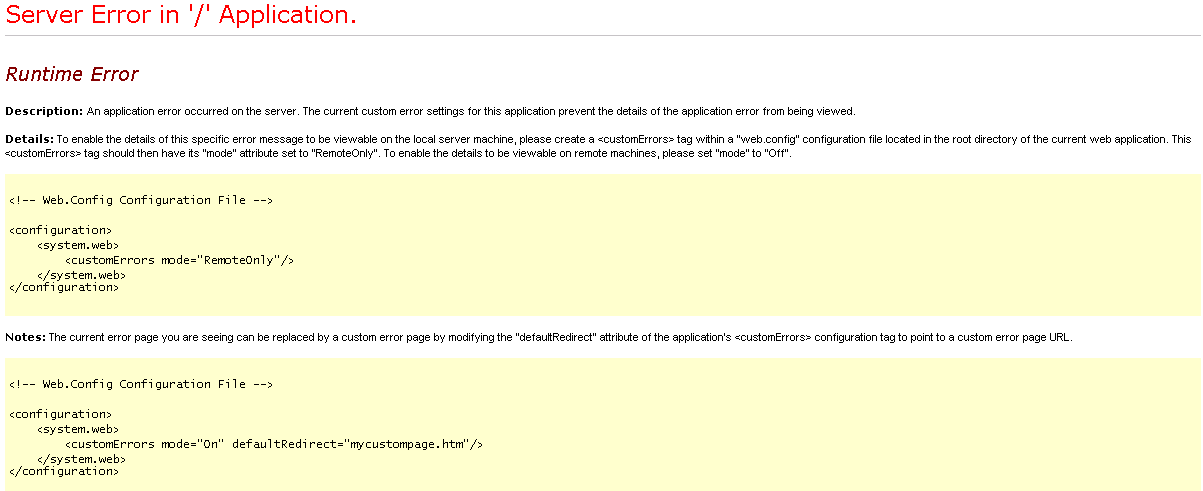
After a little googling, I found the hint, that there's another (new) location for the web.config in C:\Program Files\Common Files\Microsoft Shared\Web Server Extensions\14\TEMPLATE\LAYOUTS.
There you have to set customErrors mode to "Off" as you know it and everything works fine again.
Donnerstag, 25. Februar 2010
Changing the button-images on EntityEditorWithPicker for a custom Picker-Field
If you ever got the task to create a custom field with custom pickerdialog-controls, don't dispair. Although there is no really helpful tutorial or how-to that illuminates the connections between field-, control-, entityeditorwithpicker-, dialogclasses and so on available on the internet (at least I never found one) and the information available on msdn is sparely too. My approach so far was to reflector all the stuff, Microsoft did in their picker-classes and I found out, that they did a lot of unbeautiful things in their classes that makes it harder to inherit from them.
As long as you just want to change the searchquery or the result-list (to achieve a behaviour similar as you know from the peopleeditor) this is no big hit. But as soon, as you start to create more individual pickerdialogs, you will run in some difficulties.
My plan for the next time is to write a few articles and how-tos about how to create custom picker-fields with more cool look and feel than known from the people-editor.
Let's start with a "simple" task. You know the two button below the entityeditor-field for checking names and browse:

Now it's the task to replace those two buttons by your own to have a closer look to the whole surrounding website-design like this one:

The locations for those two images can be set in the EntityEditorWithPicker-class and are stored in the members named CheckButtonImageName and BrowseButtonImageName. If you have a look in the msdn for that member, you'll see... absolutely nothing helpful. Even if you enter them as searchterm in google, you'll find at most one page. So I had to guess and did try-by-error-changes.
The result, you can see on the second screenshot, I achieved by setting those values to the members in the onInit-method of my inherited EntityEditorWithPicker-class:
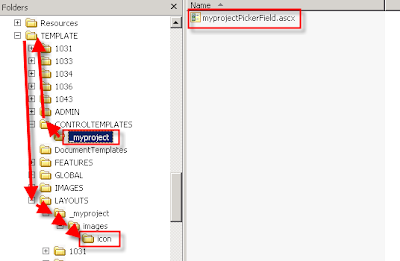
The path to the images is assembled by going to the 12\template-folder upward from the subfolder in the controltemplates-folder, where the controltemplate (that includes the entityeditor-tag) exists and after this going down to the icons in the layouts\images-folder. The following image helps you to understand this:
As long as you just want to change the searchquery or the result-list (to achieve a behaviour similar as you know from the peopleeditor) this is no big hit. But as soon, as you start to create more individual pickerdialogs, you will run in some difficulties.
My plan for the next time is to write a few articles and how-tos about how to create custom picker-fields with more cool look and feel than known from the people-editor.
Let's start with a "simple" task. You know the two button below the entityeditor-field for checking names and browse:

Now it's the task to replace those two buttons by your own to have a closer look to the whole surrounding website-design like this one:

The locations for those two images can be set in the EntityEditorWithPicker-class and are stored in the members named CheckButtonImageName and BrowseButtonImageName. If you have a look in the msdn for that member, you'll see... absolutely nothing helpful. Even if you enter them as searchterm in google, you'll find at most one page. So I had to guess and did try-by-error-changes.
The result, you can see on the second screenshot, I achieved by setting those values to the members in the onInit-method of my inherited EntityEditorWithPicker-class:
CheckButtonImageName = "../../_layouts/_myproject/images/icon/check_a.gif";
BrowseButtonImageName = "../../_layouts/_myproject/images/icon/book.gif";
The path to the images is assembled by going to the 12\template-folder upward from the subfolder in the controltemplates-folder, where the controltemplate (that includes the entityeditor-tag) exists and after this going down to the icons in the layouts\images-folder. The following image helps you to understand this:

Abonnieren
Posts (Atom)

