In any case avoid create different fields with the same Guid OR - and this is important - the same internal name.
This is never checked by the solution packaging mechanism or while adding or installing the solution to the solution store. The errormessage "No two choices should have the same ID" occurs, if you for e.g. try to add an existing field to a sharepoint list.
Be sure to check this from time to time during development-process and before setup your solution to the production server. If the system is up and running, it's very difficult to do changes here...
Posts mit dem Label errors werden angezeigt. Alle Posts anzeigen
Posts mit dem Label errors werden angezeigt. Alle Posts anzeigen
Mittwoch, 16. März 2011


Donnerstag, 11. November 2010
ExcelServices "You do not have permissions to open this file."
Today I spent hours to solve a problem most annoying. I walked through Microsoft's tutorial you can find here how to use SharePoint 2010 Excel Services to open an Excelsheet uploaded to a SharePoint-Library.
I implemented the not really complex example with the result... that nothing worked like expected. Always when the debugger was in the line of sessionId = es.OpenWorkbook(...), I've got an exception with the nothing-telling message "You do not have permissions to open this file.".
So I searched for solutions and hints at Google but all those tips there (change Excel Service Application-Settings, modify Trusted Locations, etc.) didn't work.
At last I tried something, I had in mind all the time but somehow it was too obvious that it wouldn't be the solution for my problem. And ha! As I tried anyway just for fun, it suddenly worked.
All I did, was to change the Location Type for my library in which the excel was uploaded to "HTTP". All the time before it didn't worked, this setting for here was "Microsoft SharePoint Foundation".

I implemented the not really complex example with the result... that nothing worked like expected. Always when the debugger was in the line of sessionId = es.OpenWorkbook(...), I've got an exception with the nothing-telling message "You do not have permissions to open this file.".
So I searched for solutions and hints at Google but all those tips there (change Excel Service Application-Settings, modify Trusted Locations, etc.) didn't work.
At last I tried something, I had in mind all the time but somehow it was too obvious that it wouldn't be the solution for my problem. And ha! As I tried anyway just for fun, it suddenly worked.
All I did, was to change the Location Type for my library in which the excel was uploaded to "HTTP". All the time before it didn't worked, this setting for here was "Microsoft SharePoint Foundation".
Freitag, 10. September 2010
Short tip: missing BaseType in ListTemplate...
...leads to an error-message like this:
GetUserListSchema(): Failed to initialize list properties from the list schema XML for feature '{287a98fc-9404-488d-90ae-b1a67d309cca}', template '10009': hr=0x80004005. c6487200-188d-4f97-a104-731949084550
09/10/2010 11:17:03.41 w3wp.exe (0x0D74) 0x0264 SharePoint Foundation General 8l2r High Failed to find the list schema for FeatureId '{287a98fc-9404-488d-90ae-b1a67d309cca}', list template ID 10009. Cannot create list in web "..." at URL "(null)". c6487200-188d-4f97-a104-731949084550
So before checking folder-structure in 14-Hive or analysing your VS2010-Package structure for the assumed missing schema.xml first check your ListTemplate for an existing BaseType="0"-entry.
GetUserListSchema(): Failed to initialize list properties from the list schema XML for feature '{287a98fc-9404-488d-90ae-b1a67d309cca}', template '10009': hr=0x80004005. c6487200-188d-4f97-a104-731949084550
09/10/2010 11:17:03.41 w3wp.exe (0x0D74) 0x0264 SharePoint Foundation General 8l2r High Failed to find the list schema for FeatureId '{287a98fc-9404-488d-90ae-b1a67d309cca}', list template ID 10009. Cannot create list in web "..." at URL "(null)". c6487200-188d-4f97-a104-731949084550
So before checking folder-structure in 14-Hive or analysing your VS2010-Package structure for the assumed missing schema.xml first check your ListTemplate for an existing BaseType="0"-entry.
Mittwoch, 28. April 2010
Field type xxx is not installed properly. Go to the list settings page to delete this field.
A little reminder for myself (and all the other custom -field-developers) how the notation of the value for the FieldTypeClass-attribute in the fldtypes_xxx.xml has to be to prevent the nasty error message like this posting is titled:
<field name="FieldTypeClass">namespace.fieldclassname, assembly name,
Version=versionnumber, Culture=culture,
PublicKeyToken=publickeytoken</field>
Montag, 19. April 2010
"No FormURN for this page"-Error after importing reusable workflow from SPD in VS
Since this morning I am experimenting again with the new workflows in SharePoint 2010. This time I tried to import a workflow I created with SharePoint Designer 2010 and afterwards import it in Visual Studio 2010 to extend its functionality. This MSDN Tutorial seemed to fit my requirement.
But after finishing the last step and the try to start the workflow, I got the errormessage "The workflow template has specified no FormURN for this page.". Hm, I thought, I forgot some step or misconfigured something but I did all well. Spent some time googling and finally found this blogpost.
It says, I should remove all the ...URL-Attributes from the Workflow-Tag in my Elements.xml. So I did and removed InstantiationUrl="_layouts/IniWrkflIP.aspx" and 'et Voila', the result was like the MSDN-tutorial promised.
But I still don't have any clue why the workflow designed and directly published from SPD does work but after importing and publishing from VS does not before I do the descriped modifications.
Any ideas and comments are welcome... :-)
But after finishing the last step and the try to start the workflow, I got the errormessage "The workflow template has specified no FormURN for this page.". Hm, I thought, I forgot some step or misconfigured something but I did all well. Spent some time googling and finally found this blogpost.
It says, I should remove all the ...URL-Attributes from the Workflow-Tag in my Elements.xml. So I did and removed InstantiationUrl="_layouts/IniWrkflIP.aspx" and 'et Voila', the result was like the MSDN-tutorial promised.
But I still don't have any clue why the workflow designed and directly published from SPD does work but after importing and publishing from VS does not before I do the descriped modifications.
Any ideas and comments are welcome... :-)
Montag, 12. April 2010
Custom errors in SharePoint 2010
The previously announced postings about creating custom picker-fields are still on hold on my site, I'm deeply sorry for that. Currently I'm familiarize oneself with SharePoint 2010 and there's less time for writing large articles like the promised but it will come, I swear! ;-)
Instead of that, here comes a little hint I found while playing around with the 2010 beta. You all know how to enhance the error-logging by setting customError mode to "Off". I did this in web.config in inetpub-directory but the page still throws such an error-message:

After a little googling, I found the hint, that there's another (new) location for the web.config in C:\Program Files\Common Files\Microsoft Shared\Web Server Extensions\14\TEMPLATE\LAYOUTS.
There you have to set customErrors mode to "Off" as you know it and everything works fine again.
Instead of that, here comes a little hint I found while playing around with the 2010 beta. You all know how to enhance the error-logging by setting customError mode to "Off". I did this in web.config in inetpub-directory but the page still throws such an error-message:
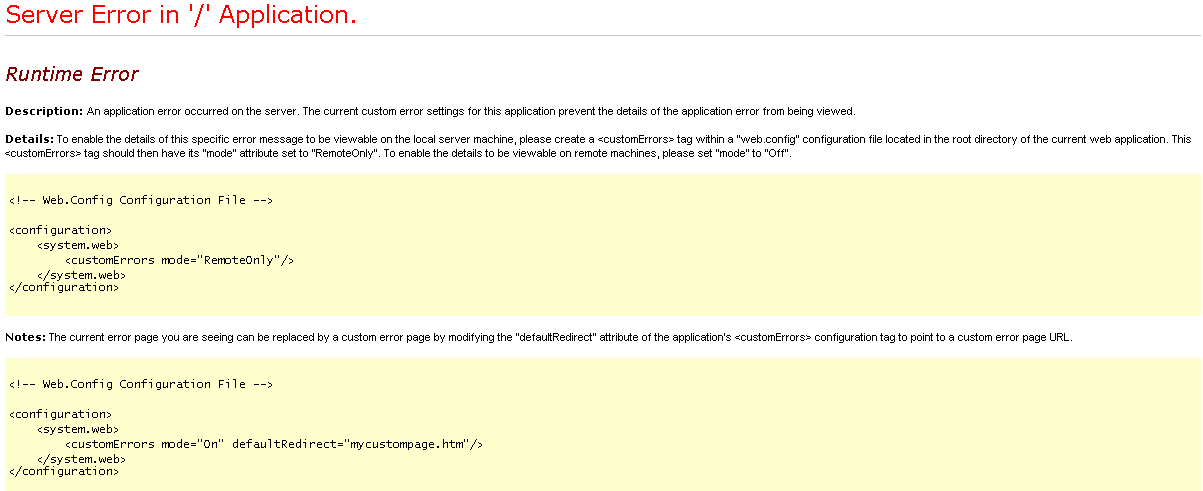
After a little googling, I found the hint, that there's another (new) location for the web.config in C:\Program Files\Common Files\Microsoft Shared\Web Server Extensions\14\TEMPLATE\LAYOUTS.
There you have to set customErrors mode to "Off" as you know it and everything works fine again.
Abonnieren
Posts (Atom)

