Mittwoch, 8. Juli 2020

WARNING: Unable to resolve package source 'https://www.powershellgallery.com/api/v2/'.

Hi everybody,

recently I tried to download PowerShell modules inside my development-image in VirtualBox by using the save-module-cmdlet which leads to this errormessage:


PS C:\Windows\system32> save-module microsoftteams -path c:\temp
WARNING: Unable to resolve package source 'https://www.powershellgallery.com/api/v2/'.
PackageManagement\Save-Package : No match was found for the specified search criteria and module name
'microsoftteams'. Try Get-PSRepository to see all available registered module repositories.
At C:\Program Files\WindowsPowerShell\Modules\PowerShellGet\1.0.0.1\PSModule.psm1:1561 char:21
+             $null = PackageManagement\Save-Package @PSBoundParameters
+                     ~~~~~~~~~~~~~~~~~~~~~~~~~~~~~~~~~~~~~~~~~~~~~~~~~
    + CategoryInfo          : ObjectNotFound: (Microsoft.Power...ets.SavePackage:SavePackage) [Save-Package], Exceptio
   n
    + FullyQualifiedErrorId : NoMatchFoundForCriteria,Microsoft.PowerShell.PackageManagement.Cmdlets.SavePackage


Trying to connect to the displayed https-url also failed while opening it in browser succeded:


PS C:\Windows\system32> invoke-webrequest https://www.powershellgallery.com/api/v2/
invoke-webrequest : The underlying connection was closed: Could not establish trust relationship for the SSL/TLS
secure channel.


So after hours of checking all possible proxy/certificate/ssl-settings, I found the solution in powershell itself:

Because of reasons I had added the SharePoint-Powershell SnapIn to c:\Windows\System32\WindowsPowerShell\v1.0\profile.ps1 which afterwards broke something so that all connections to https broke.

After commenting out the Add-PSSnapin "Microsoft.SharePoint.PowerShell" everything works like a charm.

If you encounter something similar, try this. And if you try to save changes to profile.ps1 ensure that you opened the file in your editor as administrator. You can test the successful save by adding a write-host-output to the screen. Finally don't forget to close the current and reopen a new PowerShell.

Dienstag, 4. Juli 2017

Restore deleted Form-WebParts (NewForm.aspx, EditForm.aspx, DispForm.aspx)

If a clever user hits on the idea to delete the form webpart from NewForm.aspx, EditForm.aspx or DispForm.aspx, this can be restored easily with PowerShell. No need to open SharePoint Designer.

Basically a new ListFormWebPart-object must be instanciated, connected with the list and added to the webpartzone of the page. That's it.

Have a look at the following code:

$site = New-Object Microsoft.SharePoint.SPSite -ArgumentList http://sitecollection/sites/site1
$web = $site.OpenWeb()

$list = $web.Lists["My Library"] #title of the regarding list

$webpart = new-object Microsoft.SharePoint.WebPartPages.ListFormWebPart

# assign list to webpart
$webpart.ListId = $list.ID

# possible pagetypes are PAGE_DISPLAYFORM, PAGE_EDITFORM, or PAGE_NEWFORM
# see: https://msdn.microsoft.com/en-us/library/microsoft.sharepoint.webpartpages.listformwebpart.pagetype.aspx
$webpart.PageType = "PAGE_EDITFORM"

# use the absolute link to the form-aspx
$wpm = $web.GetLimitedWebPartManager("http://sitecollection/sites/site1/myLibrary/Forms/EditForm.aspx", [System.Web.UI.WebControls.WebParts.PersonalizationScope]::Shared)

$wpm.AddWebPart($webpart, "Main", 1)

# dispose spweb-object in webpartmanager to avoid memory leaks
$wpm.Web.Dispose()

$web.Dispose()
$site.Dispose() 

Mittwoch, 10. September 2014

Adding ECB directly to document libraries

Recently I used to look for a possibility to change the SharePoint 2013 ECB (Edit Control Block) from CallOut-Popup back to direct call as known from SharePoint 2010.

I found this way as a quick work around:
http://www.learningsharepoint.com/2013/05/18/hide-callouts-in-a-sharepoint-2013-task-list/

But by this solution, the drag-and-drop area is not rendered anymore and the old-fashioned "Add new item"-link below the list returns.

So I spent a little more time with googeling and found this page which adds an additional icon to click which displays the ECB directly:

http://www.booden.net/DirectAccessToEcb.aspx

The site describes the How-To and provides a sandboxed-solution for directly adding to the solutions-gallery of the SiteCollection. After activating everything to do is finished.

As you can see, the standard behaviour is not touched but extended by a new functionality:


It depends to the customer's wish if the three-dots-button now should be hidden (needs some additional work) or both buttons should remain.


Dienstag, 8. Juli 2014

SPFile.Publish() writes 'System Account' to 'ModifiedBy'-column instead of current user

I had the following scenario:

Documents that are dragged&dropped in a documentlibrary should be enriched with additional metadata and after that they should be published.
The document library has versions enabled with minor versions.

All action takes place in a SPItemEventReceiver, the details for that I'll omit for now.

Now when it came to do spFile.Publish(), after that the "ModifiedBy"-Column has 'System Account' instead of the current user and there seemed no way to set it manually. Neither the Publish-Method had a parameter to set the current user, nor SPListItem.SystemUpdate or SPListItem.UpdateOverwriteVersion worked:

- SystemUpdate won't save changes to CreatedBy/Created or ModifiedBy/Modified-fields.
- UpdateOverwriteVersion would work but creates a minor version (1.1 in my case)

But then I found a solution here.

I couldn't believe that and tried it out and it really worked! The post said, the SPSite-Object should be opened by adding the SPUserToken to the constructor and then SPFile.Publish() will save the user as last modifier. To show a concrete minimal example:

using (SPSite spSite = new SPSite(properties.SiteId, properties.OriginatingUserToken)) {
 using (SPWeb spWeb = spSite.OpenWeb(serverRelativeWebUrl)) {
  SPListItem spListItem = spWeb.GetListItem(properties.Web.ServerRelativeUrl); // make sure, the file is checked in before or try to acces or you get a file-not-found-error here 
  SPFile spFile = spListItem.File; 
  ... add more data to spListItem... 
  spListItem.SystemUpdate(false); 
  ... check for enabled versions, etc... 
  spFile.Publish(); // writes the SPUser related to the SPUserToken from properties.OriginatingUserToken to 'ModifiedBy'-column, if SPSite is instantiated with new SPSite(properties.SiteId) only, 'System Account' is used
 }
}

properties is the default SPItemEventProperties-object from the SPItemEventReceiver.

Pay attention, the "Modified"-Column (DateTime) changes to DateTime.Now. But this was not in the focus of my requirement.

I always thought, using new SPSite(Guid) would open  the SPSite in current user's context but that's not true as a closer look by using Reflector shows. Have a look at two of the default constructors from SPSite-class:

public SPSite(System.Guid id) : this(id, SPFarm.Local, SPUrlZone.Default, SPSecurity.GetDefaultUserToken())


public SPSite(System.Guid id, SPUserToken userToken) : this(id, SPUrlZone.Default, userToken)

Do you note the difference? :-)   

Montag, 30. Juni 2014

Avoiding conflicts if Custom_AddDocLibMenuItems-function is implemented multiple

Today I found a really helpful tip how to add custom items to the SharePoint Edit Control Block (ECB) without getting in conflict with other used Custom_AddDocLibMenuItems-function-calls (for e.g. from another deployed wsp-solution or script added in a Content Editor WebPart (in SharePoint 2010) or ScriptEditor-WebPart (in SharePoint 2013).
You can find it here in Stuart Roberts' blog: http://www.stuartroberts.net/index.php/2014/01/21/quick-tip-19

Montag, 25. November 2013

A potentially dangerous Request.Form value was detected from the client (ctl00$PlaceHolderMain$...

Recently I got the following errormessage in SharePoint 2013 after trying to save an edited publishing page. Also it was not possible to add any webpart.
Some googling resultet in different web.config-modifications, some said to set requestValidationMode="4.0" to requestValidationMode="2.0" in <system.web>-node, others recommended to set validateRequest="false"in <pages>-node. In fact for it only worked after I did both changes. So search for

<system.web>
 <httpRuntime requestValidationMode="4.0" />
</system.web>

and set requestValidationMode to "2.0" and search for

<pages enableSessionState="false" enableViewState="true" enableViewStateMac="true" validateRequest="true" clientIDMode="AutoID" pageParserFilterType="Microsoft.SharePoint.ApplicationRuntime.SPPageParserFilter, Microsoft.SharePoint, Version=15.0.0.0, Culture=neutral, PublicKeyToken=71e9bce111e9429c" asyncTimeout="7">
      <namespaces>
        <remove namespace="System.Web.UI.WebControls.WebParts" />
      </namespaces>
      <tagMapping>
        <add tagType="System.Web.UI.WebControls.SqlDataSource, System.Web, Version=4.0.0.0, Culture=neutral, PublicKeyToken=b03f5f7f11d50a3a" mappedTagType="Microsoft.SharePoint.WebControls.SPSqlDataSource, Microsoft.SharePoint, Version=15.0.0.0, Culture=neutral, PublicKeyToken=71e9bce111e9429c" />
      </tagMapping>
      <controls>
        <add tagPrefix="asp" namespace="System.Web.UI" assembly="System.Web.Extensions, Version=4.0.0.0, Culture=neutral, PublicKeyToken=31bf3856ad364e35" />
        <add tagPrefix="spsswc" namespace="Microsoft.Office.Server.Search.WebControls" assembly="Microsoft.Office.Server.Search, Version=15.0.0.0, Culture=neutral, PublicKeyToken=71e9bce111e9429c" />
      </controls>
    </pages>

and set validateRequest to "false".

Donnerstag, 2. Mai 2013

Get current versions for activated features (not feature definitions) in a web or site collection

Recently I wrote a PowerShell-Script which writes the current version-numbers of web-features specified by a name-filter into a file. These versions are not from the feature-definition but from the feature activated in a web.

An example for this could be the following:
On a SharePoint-server a feature named custom_feature_1 was installed which has a version of 3.0.0.0 because it's been updated a few times during the lifecycle of the appication.
Because the rootweb was created first, the feature's version is 1.0.0.0 there. A newer subweb below has been created after the feature was updated and there the feature's version is 2.0.0.0. Now, after the third update, another web will be created where the feature now has a version of 3.0.0.0.

So how can you easily get the version of the feature activated in one of these webs?

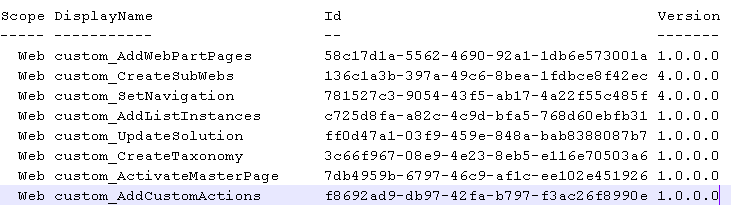
You can use this PowerShell-script to get all information about your features:

get-spweb http://customsitecollection/customweb |% {$_.Features} | where-object {$_.Definition -ne $null} | where-object {$_.Definition.DisplayName.StartsWith("custom")} |% {new-object psobject -Property @{Id = $_.DefinitionId; Version = $_.Version; DisplayName = ($_ | select -ExpandProperty Definition).DisplayName; Scope = ($_ | select -ExpandProperty Definition).Scope; }} | format-table -Property * -Autosize | Out-String -Width 120 | out-file custom_web_features.txt


Just copy these lines and replace the bold-marked parts by your own needs:
http://customsite/customweb - The full path to the web you want the feature-versions from
custom - The name that the features starts with in SharePoint-Root features-folder
custom_web_features.txt - The name of the file that's created with information

The content of the file should look like this:


You can reuse the script for site-scoped features too. Just replace get-spweb by get-spsite and a valid URL to a sitecollection.

Dienstag, 23. April 2013

"Active Deployment Configuration"-setting in Visual Studio 2012 is always "Default"

There is a bug in current Visual Studio 2012 which always sets the "Active Deployment Configuration" to "Default" after re-opening the program/solution.
If you set "No Activation", this is correctly stored in the .csproj-file but VS ignores this and preselectes "Default" on opening:

 
I reported this to Microsoft and finally got an answer that said I should install the Microsoft Office Developer Tools which were released in March 2013 (can be found here). After installing, the bug indeed was fixed and now the configuration is loaded correctly:


Personally I think, Microsoft should fix this bug in a Visual Studio update but not in an separate downloadable add-on because it's a bug by Visual Studio itself.

Freitag, 23. November 2012

Issues with Lookup-Fields with each more than 20 items

If you have multiple lookup-fields in your form which reference to more than 20 items (hardcoded limit in the LookupField-Control!), you may notice to the display and behaviour of your control:

- The rendering of the field switches from select-tag to an input-tag and an img-tag. A click on the image shows a layer with the selectfield.
- This only occures to Internet Explorer, not to Firefox.

The naughty thing on this is the issue, that the selectfield-layer appears below the first-clicked lookup-field, no matter, which lookupfield you click afterwards.

Click on the first lookup:


Click on the second lookup:


This bug can be fixed by override a function in the core.js that must be loaded immediatly in the masterpage. A good piece of working code I found here today: http://dipaktele.blogspot.de/2012/07/two-lookup-field-with-more-than-20.html

I copied the code found on this page and added it here:


function FilterChoice(opt, ctrl, strVal, filterVal) {
if (typeof (opt) != "undefined") {
var i,
cOpt = 0,
bSelected = false,
strHtml = "",
strId = opt.id,
strName = opt.name,
strMatch = "",
strMatchVal = "",
strOpts = ctrl.choices,
rgopt = strOpts.split("|"),
offSet = $(ctrl).position(),
x = offSet.left,
y = offSet.top 15,
strHidden = ctrl.optHid,
iMac = rgopt.length - 1,
iMatch = -1,
unlimitedLength = false,
strSelectedLower = "";
if (opt != null && opt.selectedIndex >= 0) {
bSelected = true;
strSelectedLower = opt.options[opt.selectedIndex].innerText;
}
for (i = 0; i < rgopt.length; i = i 2) {
var strOpt = rgopt[i];
while (i < iMac - 1 && rgopt[i 1].length == 0) {
strOpt = strOpt "|";
i ;
if (i < iMac - 1) {
strOpt = strOpt rgopt[i 1];
}
i ;
}
var strValue = rgopt[i 1];
var strLowerOpt = strOpt.toLocaleLowerCase();
var strLowerVal = strVal.toLocaleLowerCase();
if (filterVal.length != 0)
bSelected = true;
if (strLowerOpt.indexOf(strLowerVal) == 0) {
var strLowerFilterVal = filterVal.toLocaleLowerCase();
if ((strLowerFilterVal.length != 0) && (strLowerOpt.indexOf(strLowerFilterVal) == 0) && (strMatch.length == 0))
bSelected = false;
if (strLowerOpt.length > 20) {
unlimitedLength = true;
}
if (!bSelected || strLowerOpt == strSelectedLower) {
strHtml = "<option selected value=\"" strValue "\">" STSHtmlEncode(strOpt) "</option>";
bSelected = true;
strMatch = strOpt;
strMatchVal = strValue;
iMatch = i;
}
else {
strHtml = "<option value=\"" strValue "\">" STSHtmlEncode(strOpt) "</option>";
}
cOpt ;
}
}
var strHandler = " onclick=\"HandleOptDblClick()\" onkeydown=\"HandleOptKeyDown()\"";
var strOptHtml = "";
if (unlimitedLength) {
strOptHtml = "<select tabIndex=\"-1\" ctrl=\"" ctrl.id "\" name=\"" strName "\" id=\"" strId "\"" strHandler;
}
else {
strOptHtml = "<select class=\"ms-lookuptypeindropdown\" tabIndex=\"-1\" ctrl=\"" ctrl.id "\" name=\"" strName "\" id=\"" strId "\"" strHandler;
}
if (cOpt == 0) {
strOptHtml = " style=\"display:none;position:absolute;z-index:2;left:" x "px;top:" y "px\" onfocusout=\"OptLoseFocus(this)\"></select>";
}
else {
strOptHtml = " style=\"position:absolute;z-index:2;left:" x "px;top:" y "px\"" " size=\"" (cOpt <= 8 ? cOpt : 8) "\"" (cOpt == 1 ? "multiple=\"true\"" : "") " onfocusout=\"OptLoseFocus(this)\">" strHtml "</select>";
}
opt.outerHTML = strOptHtml;
var hid = document.getElementById(strHidden);
if (iMatch != 0 || rgopt[1] != "0")
hid.value = strMatchVal;
else
hid.value = "0";
if (iMatch != 0 || rgopt[1] != "0")
return strMatch;
else return "";
}
}

_spBodyOnLoadFunctionNames.push("FilterChoice");
function EnsureSelectElement(ctrl, strId) {
$("#" strId).remove();
var select = document.getElementById(strId);
if (select == null) {
select = document.createElement("SELECT");
ctrl.parentNode.appendChild(select);
select.outerHTML = "<select id=\"" strId "\" ctrl=\"" ctrl.id "\" class=\"ms-lookuptypeindropdown\" name=\"" strId "\" style=\"display:none\" onfocusout=\"OptLoseFocus(this)\"></select>";
FilterChoice(select, ctrl, ctrl.value, "");
}
return document.getElementById(strId); ;
}


After that, the select is displayed correctly:


Please be sure to include there functions in your own js-file that's loaded after the core.js and avoid modifying the original core.js.


Donnerstag, 15. November 2012

New SharePoint 2013 / 15 cmdlets for Powershell you shouldn't use...

I just browse the web for new things that come with SharePoint 2013 / 15. Now I'm landed on the technet-page for all new Powershell-Cmdlets:

http://technet.microsoft.com/library/ff678226%28office.15%29.aspx

A funny thing are a few new cmdlets you explicitely should avoid to use but the funniest imo are Add-SPSocialAppPermissions and Remove-SPSocialAppPermissions.

So if you belong to the 1% of people with a completely working user profile synchronization service without any issues and you are bored of all the perfectly working sharepoint environment, you should definitively run this cmdlet, because "The use of the Add-SPSocialAppPermissions cmdlet can result in profile synchronization connections that are unusable and non-editable".

More cmdlets you called upon not to use are:

- New-SPBECWebServiceApplicationProxy
- Remove-SPSocialAppPermissions
- New-SPBECWebServiceApplicationProxy

If you have any idea, why Microsoft creates such cmdlets not intended to use by people, please leave a comment :-D

Mittwoch, 4. April 2012

ArgumentException when setting SPUser to a UserField in SPListItem

A little hint for everyone that ever got an argument exception if he tried to set a SPUser-object to an userfield in a list item:

SPListItem listItem = list.Items.Add(listRootFolder.ServerRelativeUrl, SPFileSystemObjectType.File, null);
listItem["Owner"] = spUser; <-- if you step through the code while debugging, an argument exception may occur here 
listItem["Url"] = url; 
listItem["Title"] = title; 
listItem.Update();


In case of an argument exception, you have to check if the assigned spUser-object has been opened from the same parent web as the list.

Freitag, 17. Februar 2012

Bugfix for 'Walkthrough: Replacing a Button on the Server Ribbon'

There is an example how to replace a button on the server ribbon available in the MSDN with one issue: it doesn't work ... ;-)

But I found the error and commented it below in the Community Content-section. For completeness I'll post it in my blog again:

There exists no button with the ID 'Ribbon.Library.Actions.ConnectToClient.ReplacementButton' so a javascript-error is thrown in the browser. The part of the xml must changed to this line and then it works:

<CommandUIDefinition Location="Ribbon.Library.Actions.ConnectToClient">
  <Button Id="Ribbon.Library.Actions.ConnectToClient" Command="ReplacementButtonCommand" ...>


Just remove the string '.ReplacementButton' in the Id of the Button from the example and it works.

Dienstag, 4. Oktober 2011

Error occurs while trying to upgrade installed features of an upgraded solution

It’s way back since my last post, but at last I found something very useful to post.

During the process of developing on a SharePoint 2010 solution, to have clean presuppositions for testing and avoid phantom mistakes I very often create new site collections and delete them afterwards. A part of this process is also removing and adding newer versions of the solutions to the solution-store. So from time to time I was confronted with strange error messages when I tried to upgrade features to new versions.

I concretely tried to do it the Microsoft recommended way and used a modified version of the program, you can find here: http://msdn.microsoft.com/en-us/library/ff798298.aspx

The program that iterates over the SPWebApplication to find upgradable features sometimes fails with an error message that says that it can’t find a special SiteCollection: The site with the id D0D529C1-DC06-4DB0-A8A3-81466E1E75DB could not be found.
This is true because it has been previously deleted by me and is no longer available in Central Administration or anywhere else. It seems, there are still some SiteCollection-related artifacts in the content database stored that prevent a clean upgrading of the new versioned features.

Have a look at the Default TimerJobs,  the promisingly entry “Gradual Site Delete”, we perhaps can use to solve this issue with tools out of the box. By default it’s executed daily but we can change the cycle to earlier executions or even start it manually.

This blog described its functionality as “Deletes all the data from the host content database for all deleted site collections”. What a pitty, in my case, it doesn’t. The error remains.

Now it’s time to have a look at the content database. The name of this table looks encouraging: dbo.SiteDeletion

After opening the table, an entry appears that includes the evil SiteId, which seems to be the crux of the matter:


Luckily Microsoft gave us the method ForceDeleteSite on the SPContentDatabase-class.

If you write a really short program, for e.g. a console application that takes the Uri to get the SPWebApplication-object and the Guid of the corrupted SiteCollection, you can create a new entry to the database-table with a datetime of 1900-01-01.


Simply, there are only those two lines needed:

SPWebApplication spWebApplication = SPWebApplication.Lookup(new Uri("http://mywebapplication")); // insert the webapplication

spWebApplication.ContentDatabases[0].ForceDeleteSite(new Guid("D0D529C1-DC06-4DB0-A8A3-81466E1E75DB"), true, false); // insert the ID from the errormessage


After that, retry running the “Gradual Site Delete”-timerjob and – surprise – both entries are deleted.


If you retry upgrading your feature, no more annoying error message occurs.

Dienstag, 12. Juli 2011

Anonymous access prompted for login after click in web part area on publishing portal

Currently I'm experimenting with publishing portal and the ability to use it for publicfacing internet sites where anonymous access is allowed. In the site permissions I gave the anonymous users access to the entire website.
Afterwards I created a custom list named 'Test' and entered three simple items with just the title-field filled.

On the default.aspx of the publishing portal I added a ListVievWebPart to the 'Test'-list and published it.

Now if the anonymous user loggs in, he sees the default publishing page with that LVWP and three items in it.But if he clicked on an item, the login-popup appeared. Also if I tried to break the list-permission-inheritance from the web, the list items would open but the first click in the webpart resulted in that nasty login-popup.

So what to do? A lot of pages, blogs and forums on the internet suggest to deactivate a hidden feature called 'ViewFormPagesLockDown' to allow anonymous users to have access to list-items.
Another approach I found on several pages was to remove the coupling to the code-behind in the file wpribbon.aspx on the _layouts-folder directly to workaround the other problem.

I didn't like neither the first nor the second way. The one kills the security concept, the other transgesses the rules of Microsoft by changing files directly on the server.

So I grabbed good old SharePoint Manager 2010 and examined the 'Test'-List where I detected the AnonymousPermMask64-Attribute that had this string set by default: ViewListItems, ViewVersions, Open, ViewPages, UseClientIntegration.

This had to be the key to solve the problem... I went to the MSDN-Article describing all SPBasePermissions-enum-values and found... ViewFormPages (View forms, views, and application pages, and enumerate lists).

Okay, rest was easy... If there is a feature activated on publishing-portal called ViewFormPagesLockDown that prevents the anonymous user from entering formpages, then the basepermission ViewFormPages perhaps grants access for the element.

So I programmatically broke the inheritance of the list-permissions and reset the spbasepermissions to the AnonymousPermMask64-Attribute as you can see in the following code-segment and everything worked as I imagined:


SPList spList = spWeb.GetList("/Lists/Test");

spList.BreakRoleInheritance(false);
spList.AnonymousPermMask64 =
 SPBasePermissions.ViewListItems |
 SPBasePermissions.ViewVersions |
 SPBasePermissions.Open |
 SPBasePermissions.ViewPages |
 SPBasePermissions.UseClientIntegration |
 SPBasePermissions.ViewFormPages;

spList.Update();


Donnerstag, 7. Juli 2011

Add customaction to ribbonbar in sharepoint 2010 wiki page

Just a simple copy & paste of a custom action that adds a button to the ribbonbar in a publishingpage in the pageslist of a wiki-site:

<CustomAction Id="WikiDocumentExportCustomizationPageView" Rights="Contribute" Location="CommandUI.Ribbon" Sequence="30" Title="Wiki-Document-Export"> 
 <CommandUIExtension> 
  <CommandUIDefinitions> 
   <CommandUIDefinition Location="Ribbon.WikiPageTab.Share.Controls._children"> 
    <Button Id="WikiDocumentExportCustomizationPageView.Button" Command="ExportCurrentWikiDocumentFile2" CommandType="General" Description="Export Wiki-Document" TemplateAlias="o1" Sequence="30" Image32by32="/_layouts/images/wiki/pdf_export.png" LabelText="Export Wiki-Document"/> 
   </CommandUIDefinition> 
  </CommandUIDefinitions> 
  <CommandUIHandlers> 
   <CommandUIHandler Command="ExportCurrentWikiDocumentFile2" CommandAction="javascript:ExportCurrentWikiDocumentFile('{SiteUrl}');"/>
  </CommandUIHandlers> 
 </CommandUIExtension> 
</CustomAction>

Pay attention that this button is only visible to users with contribute-rights on the list.
ExportCurrentWikiDocumentFile is a custom external javascript-function that implements the code behind the button. You must define your own function here...

Freitag, 24. Juni 2011

Good example for a custom service application

Check out chapter 9 of the book Microsoft SharePoint 2010 Web Applications: The Complete Reference, there is a really good example how to create a custom service application. The described scenario creates a translation service and a webpart that's using it.

But be aware of a little error on page 199, change this line

public string AlternativeLanguage { get; set; }

to 
[Persisted] private string _alternativeLanguage;

public string AlternativeLanguage
{
   get { return _alternativeLanguage; }
   set { _alternativeLanguage = value; }
}

or otherwise no change of the Alternative Language would be stored.

Freitag, 17. Juni 2011

Free alternative for .net Reflector: ILSpy

Because of the fact that the most valueable tool in the SharePoint-World beside SharePoint Manager (I mean our beloved .net Reflector) is no longer free and becomes unsusable after a few weeks until it looks for updates, some resourceful developers started writing an open source equivalent, which can be found at:

http://wiki.sharpdevelop.net/ILSpy.ashx

I downloaded and tested it already and I think, it's really advanced for the short time elapsed since its development started in february 2011. The look and feel is very similar to .net Reflector and you definitely should give it a try.

Montag, 2. Mai 2011

CustomAction in ribbonbar doesn't appear for contenttype

Recently I wanted to add a contenttype-specific custom action to the ribbonbar of a document-library. But the button didn't appear. After a short time of verifying and comparing IDs with SharePoint manager, I found the issue:

GuidGen in Visual Studio created me this GUID: 717EE0C46890438e8E245E7D4B4B7438 which I used for the sitecontenttype inheriting from document (0x010100). Then the list instance creates a listcontenttype from this and appends its own GUID. But the ID from the listcontenttype is 0x010100717EE0C46890438E8E245E7D4B4B743800E57C8E7D4D7D024C9A357907E925F14B.

So what's the difference between the root? Its the lower case character 'e'. It seems as if SharePoint would have a problem with case-sensitivity. Since I changed the lower 'e' to an upper 'E' in my sitecontenttype and customaction, the button is visible now.

So please pay attention for lower case characters and replace them when generating Guids with VisualStudio GuidGen.

Montag, 28. März 2011

Dienstag, 22. März 2011

Exam 070-573 passed!

I successfully finished this exam yesterday and may entitle myself TS: Microsoft SharePoint 2010, Application Development. Hooray!

Although it's commonly said, 070-576 is the more complex exam, I personally felt the TS-exam the harder one.

Now I'm awaiting for the MCPD: SharePoint Developer 2010 status set by Microsoft...